Digital Image Foundations

How computers perceive images

2026-03-13

1. Digital Image Foundations

How computers store images

How We See: Light and The Human Eye

  • 1. Illumination: Light from a source (e.g., the sun) hits an object.
  • 2. Reflection: The object absorbs some colors and reflects others.
  • 3. Capture: Reflected light enters the eye through the pupil.
  • 4. Processing: The lens focuses light onto the retina. Photoreceptors (rods and cones) convert it to electrical signals for the brain.

How Computers “See”: The Digital Camera

  • 1. Capture: Just like the eye, the camera captures reflected light.
  • 2. Lens & Aperture: Light enters through an opening (aperture) and is focused by glass lenses.
  • 3. The Sensor: Instead of a retina, light hits a digital sensor (CMOS/CCD).
  • 4. Digitization: Millions of sensor pixels convert incoming photons into an electrical charge, which is translated into a digital matrix.

The Digital Sensor: Capturing Light

  • Photodiodes: Each pixel on a sensor forms a tiny bucket collecting photons (light).
  • Charge: More light \(\rightarrow\) more photons \(\rightarrow\) higher electrical charge.
  • Bayer Filter: Sensors capture only light intensity (grayscale). To get color, a microscopic mosaic filter is placed over them so each pixel records only Red, Green, or Blue.
  • Digitization: An Analog-to-Digital Converter (ADC) turns the electrical charge into a discrete number, typically from 0 to 255.

Grayscale Images: Pixels & Coordinates

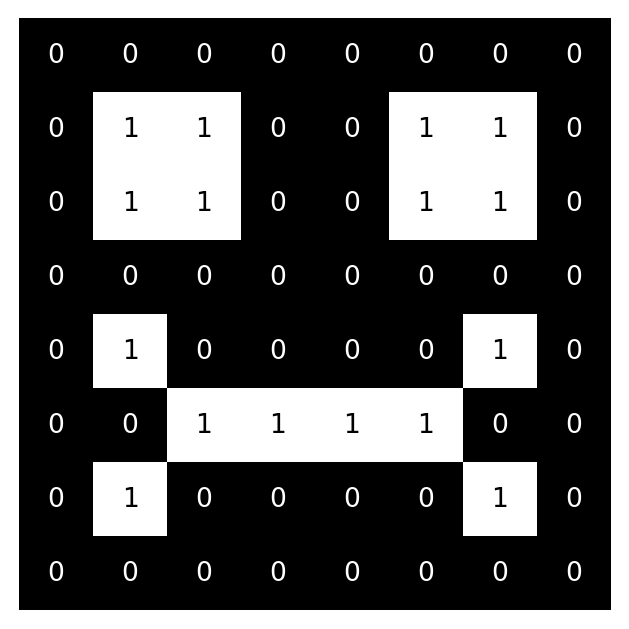
  • Images are 2D matrices of numbers. The origin (0,0) is top-left.
  • Example: an 8x8 matrix where 0 is black and 1 is white.
# 8x8 matrix (0=black, 1=white)
img = np.array([
    [0,0,0,0,0,0,0,0],
    [0,1,1,0,0,1,1,0],
    [0,1,1,0,0,1,1,0],
    [0,0,0,0,0,0,0,0],
    [0,1,0,0,0,0,1,0],
    [0,0,1,1,1,1,0,0],
    [0,1,0,0,0,0,1,0],
    [0,0,0,0,0,0,0,0]
])

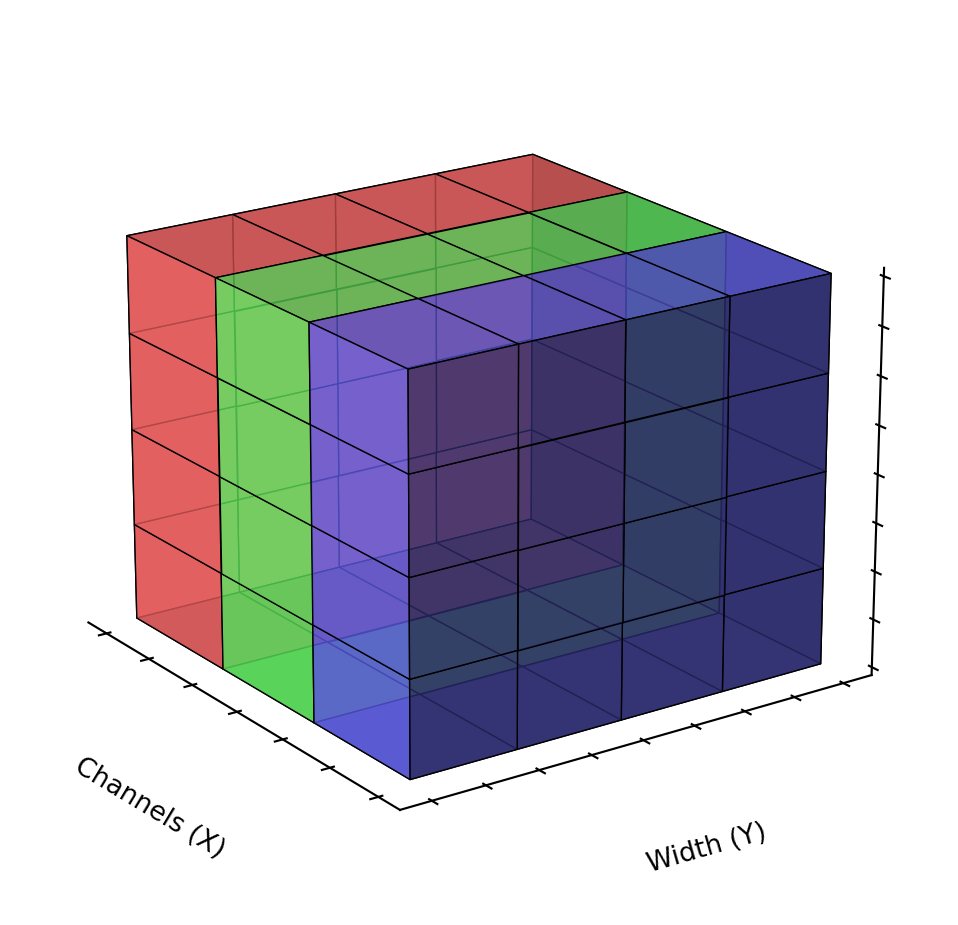
Color Images: The RGB Channels

  • Images are 3D matrices (height × width × 3 channels).
  • RGB: Red, Green, Blue. Values range from 0 (dark) to 255 (bright).

Essential Image Libraries

  • OpenCV: Very fast C++ library mapped to Python. Uses BGR channel order by default. Great for video streams and low-level transforms.
  • Pillow (PIL): Standard Python image library. Uses RGB. Easy to use for simple drawing and resizing.
  • NumPy: The core math library. Images in Python are fundamentally numpy multi-dimensional arrays (tensors).

Image Data Types: uint8 vs Floats

  • Pixels are usually 8-bit unsigned integers (uint8), meaning values range from 0 to 255.
  • 0 is Black. 255 is White (in grayscale) or full intensity (in RGB).
  • Deep Learning: Models like YOLO often prefer normalized inputs. We convert 0-255 to floats between 0.0 and 1.0 by dividing by 255.0.

Coordinates vs. Array Indexing
(The “Gotcha”)

  • We think in geometry: (x, y) = (width, height).
  • NumPy thinks in matrices: matrix[row, col] = matrix[y, x].
  • This causes endless confusion when cropping with bounding boxes (x1, y1, x2, y2).
# Assuming a bounding box (x1, y1, x2, y2)

# WRONG (Crops wrong area or crashes)
crop = img[x1:x2, y1:y2] 

# CORRECT (y = row, x = col)
crop = img[y1:y2, x1:x2] 

The “Smurf Effect”: BGR vs. RGB

  • OpenCV historically uses Blue-Green-Red (BGR).
  • Most other libraries (Matplotlib, Pillow) expect Red-Green-Blue (RGB).
  • If you read an image with cv2.imread() and plot it directly in matplotlib, Red and Blue channels are swapped!
  • Faces look blue, skies look red.

Basic I/O Operations

import cv2
import matplotlib.pyplot as plt

# 1. Read image (OpenCV loads BGR)
img_bgr = cv2.imread('dog.jpg')

# 2. Convert to RGB for accurate display
img_rgb = cv2.cvtColor(img_bgr, cv2.COLOR_BGR2RGB)

# 3. Display
plt.imshow(img_rgb)
plt.axis('off')
plt.show()

Image Resolution and Resizing

  • Resolution: Dimensions of the image (Width × Height).
  • Deep Learning models typically require fixed input sizes (e.g., 640x640).
  • Aspect Ratio: The ratio of width to height.
  • Direct Resizing: Squashes or stretches the image, changing the aspect ratio (causes distortion).
  • Letterboxing: Resizes while maintaining aspect ratio, then pads the remaining area with a solid color.

Conclusion

Wrapping up Image Foundations

Summary

  • Light & Cameras: How digital sensors capture light and turn it into data.
  • Pixels & Channels: Grayscale (2D) vs. Color RGB (3D) representations.
  • Libraries: OpenCV, Pillow, and NumPy basics.
  • Gotchas: BGR vs RGB (The Smurf Effect) and Array Indexing vs Coordinates.

Next Steps

Next up: YOLO Inference

  • Using these images with state-of-the-art Computer Vision models.
  • Running inference directly out-of-the-box.

Q&A

Thank You!

Any questions?